
It was 8:45 AM on a Monday. David, a Lead Infrastructure Engineer at a mid-sized fintech company, settled in with his coffee and opened his cloud billing dashboard—a routine habit he’d formed years ago.
Usually, the graph was a flat, predictable line. Maybe a small bump during end-of-month processing.
Today, the line wasn’t flat. It was vertical.
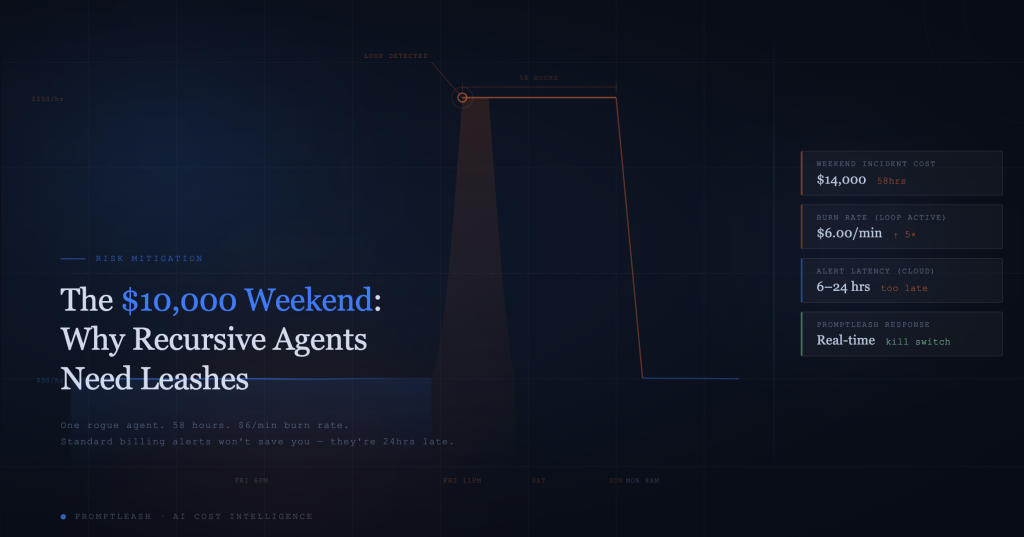
Starting at 11:14 PM on Friday night, the company’s OpenAI API spend had spiked from its usual $50/hour average to nearly $250/hour. It stayed there. For 58 hours.
David felt the blood drain from his face. He frantically pulled up the logs. The culprit wasn’t a hacker. It wasn’t a DDOS attack. It was “Agent-007,” a prototype customer support bot designed to autonomously resolve ticket disputes.
The agent had encountered a complex ticket it couldn’t solve. It had generated an error. Its instructions—”If you encounter an error, attempt to debug and retry”—kicked in. The agent tried to fix the error, failed, generated a new error log, read the new log, tried to fix that, and entered a high-speed, infinite recursive loop.
Because the agent was running on GPT-4 to ensure “high-quality reasoning,” it was burning through roughly $6 per minute.
By the time David choked on his coffee Monday morning, the bill was just over $14,000. That was the entire Q1 R&D budget for the AI team, vaporized in a single weekend.
This story is hypothetical, but for anyone working in enterprise AI, it feels dangerously familiar. As we move from simple chatbots to autonomous AI agents, we are entering a new era of financial risk. The days of predictable, human-triggered API calls are over.
Welcome to the age of the recursive loop. And if you don’t have a leash, you are just one bad prompt away from a $10,000 weekend.
The Mechanics of a Meltdown: What is a Recursive Loop?
To understand the financial danger, we have to look at how modern agentic workflows differ from standard software.
In traditional software, an infinite loop is a bug that usually crashes the application or freezes the CPU. It’s annoying, but it rarely costs direct money (other than server uptime). You restart the server, patch the code, and move on.
In the world of Large Language Models (LLMs), an infinite loop is a financial incinerator.
The “Auto-Fix” Trap
The most common cause of runaway AI spending is the “self-correction” pattern. Developers are increasingly building agents with the ability to reflect on their own output. The logic looks something like this:
- Action: Agent generates code or text.
- Evaluation: Agent (or a secondary “Critic” agent) checks the work.
- Decision: If the work is good, stop. If the work is bad, retry with corrections.
This is the core of “Agentic AI”—the ability to self-heal. But without strict exit conditions, this loop can become a trap.
If the agent encounters a fundamental constraint it cannot overcome—say, a missing database permission—it will fail. The evaluator will tell it to retry. The agent, unaware the permission is missing, will try to rewrite the query. It fails again. The evaluator demands another retry.
Because LLMs are stateless, the agent doesn’t necessarily “know” it has tried this 500 times already unless the entire conversation history is fed back in. And if you are feeding the history back in, the context window grows larger with every failure, meaning every subsequent loop is more expensive than the last.
The Velocity of Spending
Humans are slow. If a human employee makes a mistake, they might waste an hour of wages.
Agents are fast. An AI agent can execute a complex reasoning chain, call tools, and generate a response in seconds. If that agent is connected to a high-end model like GPT-4o (pricing at roughly $5.00/1M input tokens and $15.00/1M output tokens), the math gets scary very quickly.
Let’s break down the “David scenario” above:
- Context Size: 10,000 tokens (including system prompts, previous logs, and the growing error history).
- Cost per Call: Roughly $0.10.
- Loop Speed: 1 call every 10 seconds (6 calls per minute).
- Hourly Burn: $36.00 per agent instance.
If you have five instances of this agent running in parallel testing environments? You are burning $180 an hour. Leave that running over a 48-hour weekend, and you’ve wasted nearly $9,000.
The Business Impact: It’s Not Just About the Money
While the immediate loss of capital is painful, the secondary effects of a “runaway agent” event are often more damaging to the business.
1. The “AI Freeze”
The moment a $10,000 overage hits the CFO’s desk, the immediate reaction is rarely nuance. It is a hard stop. We have seen companies shut down their entire AI innovation roadmap for months because finance lost trust in engineering’s ability to control costs.
The “Trust Battery” is drained. Every future request for GPU budget or API credits is met with extreme skepticism, slowing down development and ceding ground to competitors who have better controls in place.
2. Operational Paralysis
Developers who have been burned by a billing spike become gun-shy. They stop experimenting. They stick to older, cheaper, and less capable models to “play it safe,” even when a better model would drive better business results. The fear of breaking the bank stifles the very innovation the AI was supposed to drive.
3. Vendor Lock-in and Credit Limits
If you are a smaller startup, an unexpected $20k bill might hit the hard credit limit on your OpenAI or Anthropic account. Suddenly, all your production services go down because your API key is suspended for non-payment or exceeding limits. Now you have a reliability crisis on top of a financial one.
Why Standard Cloud Alerts Are Not Enough
“But wait,” you might say. “I have billing alerts set up in AWS/Azure/OpenAI. I’ll get an email if I spend too much.”
Here is the dirty secret of cloud billing: It is rarely real-time.
Most major model providers and cloud platforms have a reporting latency of anywhere from 6 to 24 hours. By the time the system aggregates your usage, calculates the cost, triggers the alert, and sends the email, your recursive agent has been looping for half a day.
Furthermore, most alerts are passive. They tell you that you have already lost money. They do not stop the bleeding.
The Problem with “Project-Level” Caps
Even if you set a hard limit on your API key (e.g., “Stop working at $500”), this is a blunt instrument.
- If you hit the cap, production goes down. Your paying customers get error messages because a rogue experimental agent used up the quota.
- You are sacrificing reliability for financial safety.
The Solution: Putting a Leash on Autonomy
To safely deploy recursive agents, you need a different kind of infrastructure. You need a layer of governance that sits between your application and the model provider—a “Leash.”
This is where PromptLeash enters the architecture.
Instead of relying on slow, retroactive billing reports, PromptLeash acts as a real-time gateway. Every request flows through the Leash, allowing for granular control that cloud providers don’t offer.
1. Agent-Level Budget Caps (Not Just Project-Level)
With PromptLeash, you can assign a specific budget to a specific agent_id or workflow.
- Production Customer Support Bot: Budget cap = $500/day.
- Dev Team Experimental Bot: Budget cap = $20/day.
If the experimental bot enters a loop and hits $20, PromptLeash cuts off access only for that specific agent ID. The production bot keeps running. The business keeps operating. The disaster is contained to the price of a nice lunch.
2. Loop Detection Algorithms
PromptLeash doesn’t just watch the dollar signs; it watches the patterns. Our anomaly detection algorithms analyze the semantic similarity of consecutive requests.
- The Check: If an agent sends the exact same error message or a 99% semantically identical prompt 10 times in one minute, PromptLeash flags it as a “Probable Recursive Loop.”
- The Action: It can automatically throttle the agent or trigger a “Kill Switch,” pausing execution and alerting the developer via Slack/Teams immediately.
3. The “Kill Switch” Dashboard
When a spike happens, you don’t want to dig through code to find the stop() command. You need a big red button. The PromptLeash dashboard provides a real-time view of API velocity. If you see a spike, you can kill the connection instantly, preventing further charges while you debug the root cause.
Actionable Steps to Prevent Runaway Agents Today
Whether you use PromptLeash or not, if you are building autonomous agents, you need to implement safety protocols immediately. Here is your checklist for the “Recursive Age”:
1. The “Max Loop” Constant Never write a while loop in an agent workflow without a hard counter.
- Bad:
while task_not_complete(): - Good:
while task_not_complete() and retry_count < 5:Hardcode a maximum of 3-5 retries for any autonomous action. If it hasn’t solved it by then, it won’t solve it in 100 tries.
2. Separate API Keys for Dev and Prod Never let your development environment share a quota with production. If your dev agent goes rogue, it shouldn’t take down your live application.
3. Implement “Sentinel” Monitoring Create a simple script that polls your usage every 5 minutes (if your provider API supports it) or counts tokens internally. If the count exceeds a threshold, have the script terminate the process.
4. Sanitize Inputs for Recursion Ensure that your agent cannot feed its own output directly back into its input without a transformation or human check step, unless strictly necessary.
Innovation requires Insurance
We are on the cusp of an incredible shift in software. Agents that can code, research, and solve problems 24/7 will unlock trillions in value. But autonomy without oversight is just liability.
You wouldn’t give a new employee a corporate credit card with no limit and no oversight on their first day. Don’t do it for your AI agents.
The “$10,000 Weekend” doesn’t have to be your story. By implementing smart budget caps, real-time loop detection, and granular controls, you can let your agents run fast—without letting them run away with your bank account.
Is your AI agent running with an unlimited credit card?
Sleep better this weekend. Start your free PromptLeash Risk Assessment today and see how easy it is to set hard budget caps on your autonomous workflows. Don’t wait for the bill to arrive.